
Blog
Why You Should Stop Managing Construction Snags in Excel
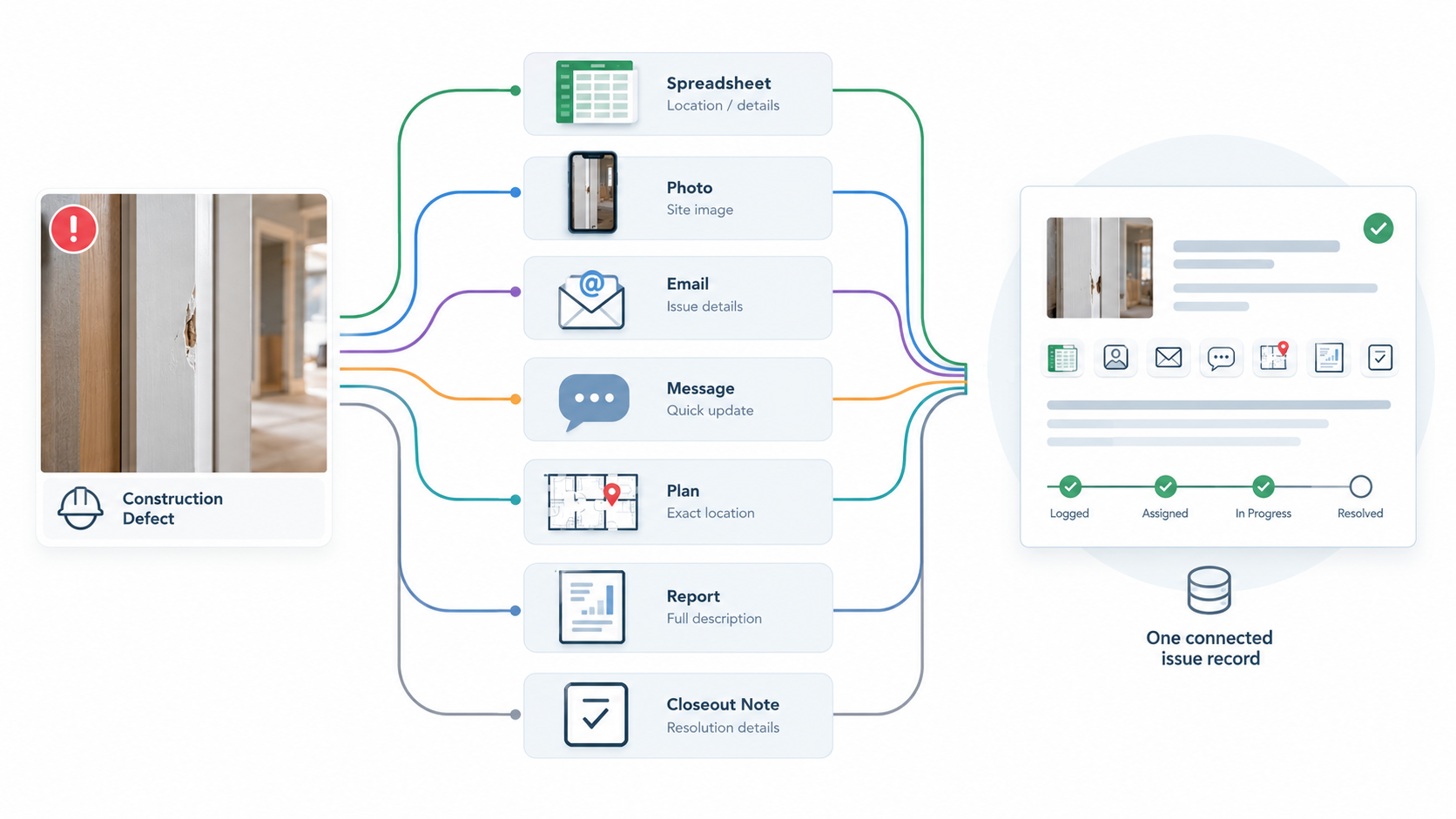
Excel is familiar, flexible and already available in many construction businesses. That is exactly why it becomes the default tool for snagging.
A site manager creates a spreadsheet. The team adds defect descriptions, locations, responsible trades and statuses. Photos are stored somewhere else. Messages about individual items happen in email or WhatsApp. A report is built later. Then, when the project moves towards handover, someone has to work out which defects are genuinely closed.
For a short and simple snag list, this may be perfectly manageable. For recurring construction inspections, multiple projects and large numbers of defects, the spreadsheet can become the process rather than simply supporting it.
That is where the snagging app vs Excel comparison becomes useful. The question is not whether Excel can store a list of snags. It can. The better question is:
Can Excel manage the complete journey from finding a snag to proving it has been resolved?
For many contractors, that is where the limitations of a spreadsheet become more obvious.
At a glance: snagging app vs Excel
- Create and edit a basic snag list: Both Excel and a dedicated snagging app can do this.
- Capture photographs during inspection: Usually a separate process in Excel, but part of an integrated workflow in a snagging app.
- Add photo markup: Often requires another tool in Excel, while it can be built into a digital workflow.
- Pin defects to a plan: Manual reference in Excel versus a location-focused workflow in an app.
- Assign issues: A spreadsheet field in Excel versus an assignment workflow in an app.
- Track site findings while walking: Possible in Excel, but purpose-built for mobile inspection in an app.
- Work offline: Depends on the Excel setup and device, while offline inspection can be supported by a snagging app.
- Keep evidence with the issue: Often separate in Excel, but designed to stay together in a digital issue record.
- Generate inspection reports: Usually manual setup in Excel, but can be part of the app workflow.
- Follow defects to closeout: Requires disciplined spreadsheet use in Excel, while a snagging app is built around issue tracking.
- Repeat across projects: Possible in Excel, but designed for recurring inspections in a dedicated system.
This is not an argument that Excel is incapable. It is a distinction between a general-purpose spreadsheet and software designed around construction inspection, snagging and defect tracking.
1. Excel was built for data tables, not site walks
A construction inspection happens in the field. The site manager is walking through rooms, checking workmanship, photographing defects, talking to trades and identifying items that need action.
Excel can record a snag number, description, location, responsible trade, status, date and comments. What it does not automatically provide is the field workflow around that table.
The contractor may still need separate tools for:
Inspection → Photograph → Locate → Assign → Communicate → Follow up → Report → Close
This creates a gap between recording a snag and managing the snag. A dedicated snagging app is designed around that workflow rather than asking the contractor to build the workflow around a spreadsheet.
2. Photographs end up outside the snag list
Construction defects are often easier to understand visually. A written entry might say, “Sealant incomplete around window.” A photograph can show exactly what the inspector saw.
The problem with a construction snagging spreadsheet is that the photo workflow is usually separate. The site manager may take photographs on a phone, save them, rename them, find the correct snag, insert or link the image, send the information to another person and repeat the process for every issue.
A digital snag list can keep photo evidence associated with the issue itself. This matters for defect reporting, photo documentation, progress reviews, verification, construction closeout and handover records.
The objective is not simply more photos. It is the right photo attached to the right issue.
3. Location is harder to manage in a spreadsheet
A spreadsheet cell can say, “Plot 14 — upstairs bedroom — near window.” That is useful, but it is still text.
On a large construction project, the contractor may need to record the building, block, floor, room, elevation, unit, plan reference and exact position.
Compare:
Excel: Flat 24 / Bedroom 2 / wall beside window
Digital inspection: Flat 24 → Bedroom 2 → plan pin → photograph → defect record
The second format gives the next person more context without requiring them to interpret the spreadsheet description.
4. Assignment becomes a spreadsheet responsibility field
A common spreadsheet approach is a column called “Responsible Trade” with values such as drylining, joinery, electrical, plumbing, flooring or decorating.
This is useful information, but it does not necessarily create a workflow. A dedicated snagging app can turn the issue into an assigned action:
Issue: Damaged skirting board
Location: Block B, Level 2, Flat 18
Assigned to: Joinery team
Action: Replace damaged section
Status: Outstanding
Evidence: 2 photographs
The important difference is that responsibility is connected to the issue rather than simply appearing in a cell. That makes it easier to follow the item through to completion.
5. Status columns do not automatically create defect tracking
A spreadsheet might contain Open, Assigned, In Progress and Complete. That is a start, but the harder questions come afterwards:
- Who changed the status?
- When was it changed?
- Has the correction been verified?
- Is there photographic evidence?
- Was the issue reopened?
- Which items are still outstanding?
- What needs to be inspected again?
A snagging software workflow can be structured around these follow-up questions, which is particularly useful when a project has a large defect list approaching closeout.
6. Excel creates more site-to-office handoffs
One of the biggest practical problems is the transition between site and office.
A typical workflow might look like this:
Site walk → notes → phone photos → Excel update → defect messages → status changes → manual report → handover clean-up
Every arrow is a handoff. Every handoff is an opportunity for information to be missed, duplicated or misunderstood.
A digital construction workflow aims to reduce those transitions:
Capture → Evidence → Location → Assignment → Tracking → Resolution → Report
7. Spreadsheets can become difficult to control
A construction snagging spreadsheet can start small. Then the project grows. More rows are added, more trades are involved, more users edit the file and more columns appear.
Someone adds another status. Another person sorts the wrong range. A filter is left active. A copied version is emailed around. Soon there are several files:
- Snagging List.xlsx
- Snagging List Final.xlsx
- Snagging List Updated.xlsx
- Snagging List Final FINAL.xlsx
The issue is not that Excel cannot handle rows. The issue is that the spreadsheet can become a shared project record without the controls of a purpose-built workflow.
8. Excel does not naturally handle recurring inspections
A contractor rarely conducts only one snagging exercise. Construction inspection is usually recurring.
The team may inspect first fix, second fix, finishes, apartments, common areas, external works, pre-handover and post-remedial work. The same issue can move through several inspections.
Instead of creating another spreadsheet for each inspection, a digital snagging system can keep a structured history of the issue and its follow-up. For recurring contractors, that can create a more consistent inspection workflow across multiple projects.
9. Reporting becomes a separate job
A common reason for using Excel is that it is easy to sort and filter. But the contractor often needs more than the working list.
The project may require a client-facing snagging report, defect report, PDF inspection report, handover list, Excel/XLSX export, supporting photographs and a record of completed issues.
If the spreadsheet is only the raw data, someone still has to turn that data into a professional report. That introduces another layer of administration. A snagging app can make reporting part of the inspection workflow instead.
10. The problem is not Excel, it is using Excel for everything
Excel is useful. Contractors use it for budgets, schedules, quantities, calculations and lists.
The problem arises when the spreadsheet becomes responsible for capture, evidence, location, communication, assignment, tracking, reporting and closeout. At that point, the business is asking one general-purpose tool to perform the job of several connected workflows.
That is where specialist snagging software can make sense.
A realistic example
Imagine a contractor inspecting ten apartments. During the morning, the site manager records 38 snags, including damaged paint, incomplete sealant, loose ironmongery, missing labels, poor flooring joints, damaged sanitaryware and incomplete electrical accessories.
With Excel, the site manager can build a list of all 38 items. But then the workflow continues. Each snag needs:
- Location: Where is it?
- Evidence: What does the defect look like?
- Responsibility: Who needs to fix it?
- Action: What exactly should happen?
- Status: Has anything been done?
- Verification: Has the fix been checked?
- Closeout: Can the issue be marked complete?
The more items there are, the more useful it becomes to keep all of those elements connected.
Where Excel still makes sense
A balanced comparison should acknowledge that Excel has legitimate uses. Excel may be reasonable when the snag list is small, one person maintains it, photographs are limited, the project is straightforward, reporting requirements are basic and follow-up inspections are limited.
A contractor does not need specialist software simply because a spreadsheet exists. The point is to recognise when the workflow has become too dependent on manual administration.
Signs you have outgrown your construction snagging spreadsheet
- The spreadsheet is constantly being updated: The snag list is now a live project system rather than an occasional document.
- Photos live somewhere else: People routinely ask which photo relates to which snag.
- Trades need repeated follow-up: The team spends time chasing updates.
- Reports take too long: The site manager finishes an inspection but still has hours of administration.
- There are several versions of the file: Version confusion is making collaboration difficult.
- Handover requires a spreadsheet clean-up exercise: The workflow is not capturing the right information at the right time.
What to look for in a snagging app
A useful snagging app should not simply put an Excel-style grid on a phone. Look for a workflow covering:
- Fast capture: Create issues quickly during a site inspection.
- Photo evidence: Take photographs and keep them attached to the correct snag.
- Photo markup: Highlight or annotate what needs attention.
- Location: Use location pins and site-plan markup where appropriate.
- Assignment: Assign issues to people, teams or trades.
- Collaboration: Let the wider project team work from the same information.
- Offline inspection: Continue working where connectivity is unreliable.
- Defect tracking: See what remains outstanding and what has been completed.
- Reporting: Produce professional PDF and Excel/XLSX outputs where required.
- Recurring use: Manage multiple projects and inspections without recreating the workflow each time.
A practical snagging app vs Excel test
Rather than debating the tools in theory, test both workflows using the same real inspection:
- Capture five snags: Time how long it takes to record them accurately.
- Add photographs: See how many steps are required before the evidence is connected to the correct issue.
- Add locations: Ask another team member to find the five issues using only the recorded information.
- Assign the work: Give three issues to different trades.
- Update progress: Mark one issue in progress, one completed and one still outstanding.
- Verify the repair: Add follow-up evidence to a completed issue.
- Produce a report: Create the document you would actually send to a client, manager or project team.
The question is not which software has the longer feature list. The question is:
Which workflow requires less duplication while still producing a reliable project record?
What the digital workflow looks like
- Capture: Record the defect immediately.
- Photograph: Add evidence while you are looking at the issue.
- Locate: Pin the issue to the relevant site or plan location.
- Assign: Give responsibility to the relevant user, team or trade.
- Track: Monitor whether the issue is outstanding, in progress or completed.
- Verify: Check the corrected work and record the result.
- Report: Generate the required inspection, defect or closeout documentation.
This is the core difference between an Excel list and a purpose-built snagging workflow.
How Site Audit & Plan fits
Site Audit & Plan is positioned as a simple, affordable way to capture, manage and report site issues.
Its key workflow themes include fast issue and defect capture, location pins, site-plan markup, photo evidence and annotation, assigning defects or issues, team collaboration, offline inspection, tracking issues through to completion, professional PDF reporting, Excel/XLSX reporting and support for multiple projects and inspections.
That means a contractor can use the platform as a dedicated digital inspection and snagging workflow rather than creating the process manually around an Excel workbook.
Excel migration: how to move your existing snag list
Moving away from a familiar spreadsheet does not have to happen all at once.
- Clean the current list: Standardise defect descriptions, locations, responsible trades, statuses and dates.
- Remove duplicates: Resolve repeated issues before moving the live list to a new system.
- Separate live and closed items: Identify what still needs action and what is only historical reference.
- Identify supporting evidence: Match photographs and other documentation to the defects that still matter.
- Create a consistent workflow: Decide what the team means by Open, Assigned, In Progress, Ready for Inspection and Closed.
- Test one project first: Run the digital workflow on a real project before changing every site.
- Make the new process the source of truth: Once the team is comfortable, avoid returning to parallel spreadsheets unless there is a specific reason.
Contractor checklist: is it time to move beyond Excel?
- We manage construction snags every week.
- We inspect more than one project.
- Our snag list contains photographs stored separately.
- We regularly assign issues to subcontractors.
- We spend time chasing defect updates.
- Several people edit or receive the snag list.
- We regularly create reports from spreadsheet data.
- We use WhatsApp alongside Excel to discuss defects.
- We repeat inspections on the same areas.
- Handover requires a major defect-list clean-up.
- We need clearer location information.
- We need an offline inspection workflow.
- We want PDF and Excel/XLSX reporting.
The more of these statements that apply, the more useful it may be to evaluate a dedicated snagging app.
A better question than “Can Excel do it?”
Excel can probably do many individual parts of snagging. That is not the real test.
The better question is:
How many separate steps does the team need to perform around Excel to get the complete result?
A spreadsheet can store a defect. A photograph can show the defect. An email can assign it. WhatsApp can discuss it. Another spreadsheet can track it. A document can report it. A follow-up photograph can prove it.
The problem is that all of those records can become disconnected. A digital snagging workflow brings the pieces closer together.
Bottom line
The case for moving beyond Excel is not that spreadsheets are bad. It is that construction snagging is no longer just a list of rows when the project involves repeated inspections, multiple trades, photographs, locations, assignments, status changes, reporting and closeout.
For contractors, the snagging app vs Excel decision should therefore be based on workflow.
Keep Excel where it genuinely works. Consider a dedicated snagging app when the team needs a more connected process for:
Capture → Evidence → Location → Assignment → Tracking → Verification → Reporting
That is the point at which digital snagging stops being about replacing a spreadsheet and starts being about improving the construction workflow around it.
Frequently asked questions
Can Excel be used for construction snagging?
Yes. Excel can work well for simple snag lists, particularly when the number of issues, users and inspections is limited. The main challenge appears when the spreadsheet becomes responsible for photographs, locations, assignments, follow-up and reporting as well as the defect list itself.
What is the difference between a snagging app and Excel?
Excel is a general-purpose spreadsheet tool. A snagging app is designed around inspection and defect workflows, usually connecting issue capture with evidence, location, responsibility, tracking and reporting.
Is snagging software better than Excel?
The answer depends on the project. A spreadsheet can be sufficient for a small and straightforward snag list. Dedicated snagging software becomes more relevant when contractors manage recurring inspections, multiple projects, photographs, subcontractor assignments and closeout.
Can a snagging app replace a construction snagging spreadsheet?
For many digital workflows, yes. A dedicated app can provide a structured alternative to the spreadsheet, particularly when the contractor needs mobile capture, photographs, location tools, issue assignment, tracking and reporting.
What should a contractor look for in a snagging app?
Look for fast issue capture, photo evidence, photo markup, location pins, site-plan markup, assignment, collaboration, offline inspection, defect tracking, reporting and support for repeated inspections.
Why are photographs important when managing construction snags?
Photographs provide visual evidence of the condition observed during the inspection. Keeping the photograph attached to the relevant snag can make communication, follow-up and closeout easier to manage.
Can construction snagging software work offline?
Some platforms support offline inspection so users can continue recording issues where connectivity is unreliable. Contractors should check the exact offline capabilities of any product they evaluate.
Can a contractor still export to Excel after moving to a snagging app?
Some snagging software platforms support Excel or XLSX reporting. This can allow contractors to retain spreadsheet-based outputs where project teams require them while using a digital workflow for the inspection process.
More from the blog
- How to Digitise Your Construction Snagging Process
- The Site Manager’s Guide to Construction Inspections
- Common New Build Defects: What Should You Look For?
- What Should a Site Manager Record During an Inspection?
- How to Snag a New Build Home
- Construction Defect Management Software: A Complete Guide
- Best Construction Inspection Apps for Site Managers: What to Look For
- How Much Does Snagging Software Cost?