
Blog
How to Digitise Your Construction Snagging Process

If your construction snagging process involves a notebook, a camera roll, WhatsApp messages and an Excel spreadsheet, the problem is not that your team cannot find defects. It is that the information can become difficult to manage after the site walk.
A digital snagging process brings the key parts of snag management into one workflow: capture the issue, photograph it, record where it is, assign responsibility, track progress and verify completion.
For site managers and small construction companies, digitising snagging does not have to mean adopting a complicated construction management platform. A focused snagging app can provide a simpler way to manage recurring inspections and outstanding defects.
This guide explains how to move from manual snag lists to a practical digital snagging workflow, what to digitise first, and what to look for in snagging software.
What does it mean to digitise construction snagging?
Digital snagging means recording and managing construction defects and outstanding work electronically rather than relying primarily on paper lists or disconnected files and messages.
Instead of writing “Door problem - flat 4”, you can create a structured digital issue containing:
- The exact location
- A clear description
- A photograph
- A marked location on a plan where useful
- The responsible person or trade
- The current status
- Any required action and follow-up information
The objective is not simply to replace a piece of paper with a phone screen. It is to create a continuous workflow from finding the snag to confirming that it has been resolved.
Why digitise your construction snagging process?
Manual snagging can work on a small job with only a handful of issues. The difficulties usually appear as the number of snags, people or inspections increases.
A typical manual process might look like this:
- The site manager walks the project with a notebook.
- Defects are written down and photos are taken separately.
- Findings are sent to subcontractors by message or email.
- Someone transfers the information into Excel.
- The spreadsheet is updated as work is completed.
- The site manager returns to check the repairs.
- A report is assembled from several sources.
Every handoff creates another opportunity for information to be missed, duplicated or misunderstood. A digital snagging workflow can reduce those handoffs by keeping the issue record, evidence, location, assignment and status connected.
The problems with paper, Excel and messaging apps
There is nothing inherently wrong with paper, spreadsheets or messaging. The problem is using several disconnected tools for the same snag.
Paper snag lists
- Handwriting can be difficult to interpret.
- Notes have no direct connection to photographs.
- Sheets can be lost or damaged.
- Reports require manual copying.
- It is difficult to see current status away from site.
Excel snag lists
A spreadsheet gives you more structure, but photographs, marked-up plans, messages and follow-up checks can still live somewhere else. The list itself may work well while the overall process remains a manual tracking exercise.
WhatsApp and other messaging workflows
Messaging apps are useful for quick communication, but a conversation is not necessarily a good defect management system. Later, someone still has to work out which project and room the photo relates to, who owns it, whether it was fixed and where the original evidence is.
Start by mapping your existing snagging process
Before choosing a snagging app, map what actually happens on your projects. Write down what happens from the moment a snag is discovered to the moment it is signed off.
Inspect → Capture → Photograph → Locate → Assign → Resolve → Verify → Report
Then identify where information is currently being duplicated or lost. Ask where snags are first recorded, where photographs are stored, how locations are identified, how issues are assigned, where status is updated, how completed snags are verified and how the final report is produced.
Step 1: Capture snags on site
The first improvement is to capture the issue at the moment you find it. A snagging app should make this quick enough that the site manager does not feel they are creating unnecessary administration.
Record the basic information while you are standing in front of the defect:
Location: First floor, Bedroom 2, east wall
Snag: 450mm vertical crack to plasterboard beside window
Action: Fill, sand and redecorate
Status: Open
Fast issue capture matters because delaying documentation creates memory gaps and makes it easier for photographs and notes to become separated.
Step 2: Add photo evidence
Photos should be part of the snag record rather than a separate collection in a phone gallery. Take a close-up when the detail matters and a wider photograph when context is useful.
A damaged internal door, for example, might need a close-up showing the scratch, a wider photograph showing the door and surrounding room, and a location reference identifying the room.
Photo markup can also help when a defect is difficult to identify in a wider image. A simple circle or annotation can show the person carrying out the repair exactly what the inspector is referring to.
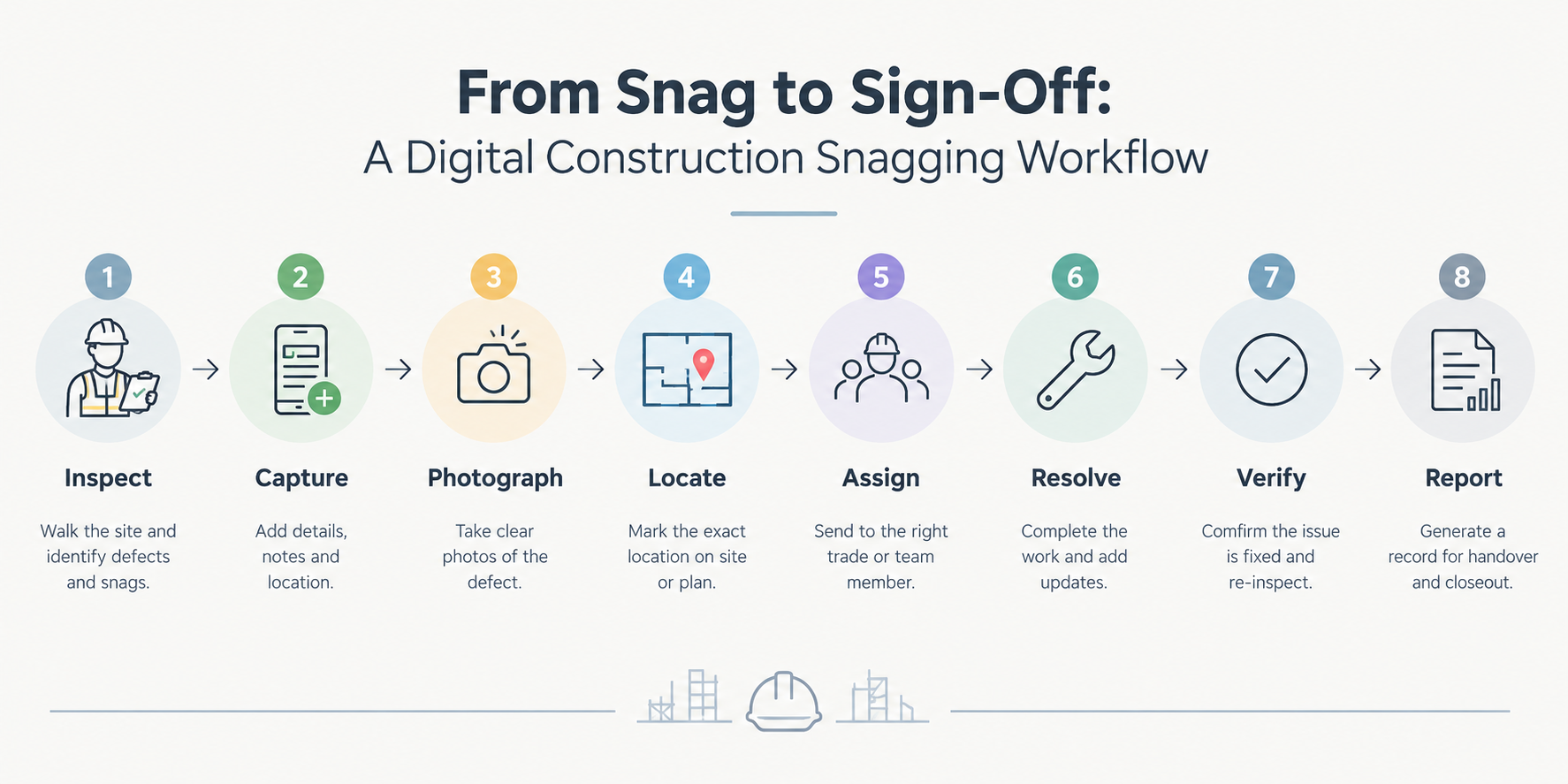
A connected digital workflow takes a snag from inspection through to verification and reporting.
Step 3: Record the exact location
A snag is much easier to resolve when the person receiving it can find it without asking for directions. Use a consistent location structure such as Project → Block → Floor → Room → Element.
For larger projects, site plan or floor plan markup can provide another layer of clarity. A location pin can show the general position, while the written description explains the exact defect.
“First floor, Bedroom 2, east wall, approximately 300mm above skirting and beside window reveal” is far more actionable than “Bedroom 2 wall”.
Step 4: Assign every actionable snag
A digital snag list should make ownership clear. If a defect belongs to the decorating team, assign it to the appropriate person or trade. Assignment changes the snag from an observation into an actionable task.
Snag: Paint damaged to bedroom door frame
Location: Second floor, Bedroom 4
Action: Prepare and repaint affected area
Assigned to: Decorating team
Status: Open
Step 5: Track snags through to completion
Digitising the capture stage without improving follow-up only solves half the problem. The team also needs to see what remains outstanding.
A simple status workflow might be:
Open → Assigned → In progress → Ready for inspection → Resolved
Your exact statuses can be different, but they should reflect how work is actually managed on site. The site manager should be able to identify outstanding issues without manually comparing a current list with an older one.
Step 6: Verify the repair
A subcontractor marking a task complete does not necessarily mean the issue has been fully resolved. Where appropriate, the site manager should inspect the completed work.
Original snag: Chip to skirting board in living room.
Assigned action: Fill, sand and repaint.
Status: Ready for inspection.
Verification: Site manager checks the repaired area and adds a new photograph.
Final status: Resolved.
Step 7: Generate the report
Reporting should not require the site manager to rebuild the inspection manually. A useful digital snagging workflow should turn the information already captured into a professional report.
Depending on your needs, that might include:
- Project details and inspection date
- Areas inspected
- Snag descriptions and photographs
- Locations, responsibilities and statuses
- Outstanding issues and resolution information
For a small construction company, PDF or Excel/XLSX reports can be particularly useful because the information can be shared with clients, subcontractors or the office without recreating the inspection from scratch.
What should you look for in a snagging app?
Not every construction app is designed specifically for snagging. If the main requirement is recurring defect capture and follow-up, focus on the workflow rather than the number of features advertised.
Fast issue capture
The app should let you record a snag quickly while walking the site.
Photo capture and markup
Look for straightforward photo capture and, where useful, annotation or markup so evidence remains part of the issue record.
Location information
A useful snagging app should make it easy to record where an issue was found. Plan markup and location pins can make this clearer on larger projects.
Assignment and status tracking
Issues need owners, and the app should make it easy to see what is open, being worked on and resolved.
Offline functionality
Construction sites do not always have reliable connectivity. Offline snagging allows the team to continue capturing information when there is no dependable internet connection.
Reporting and recurring inspections
Check whether the software produces suitable PDF and Excel/XLSX outputs and supports repeated inspections across multiple projects.
Simplicity
Small construction companies rarely benefit from buying complexity for its own sake. Choose a system the people doing the inspections can understand and use consistently.
How to move from Excel to a digital snag list
If your team already uses Excel, do not try to change everything at once. Start by standardising the information in your current spreadsheet.
| Current field | Digital equivalent |
|---|---|
| Snag description | Structured issue description |
| Room | Location |
| Photo filename | Attached photo evidence |
| Contractor | Assigned person or trade |
| Status | Issue status |
| Notes | Action and follow-up notes |
The biggest gain is not necessarily eliminating Excel. It is reducing the amount of manual copying required to get information from the site into the office.
How to introduce digital snagging to a small team
Technology only helps if the team uses it. Keep the rollout practical:
- Start with one project: Choose a live project where snagging is already happening regularly.
- Agree on a standard: Decide what every snag must contain, such as location, description, photo, owner and status.
- Keep the process short: Do not create ten mandatory fields if five will do.
- Show the complete workflow: Demonstrate how a snag is captured, assigned, updated, reinspected, closed and reported.
- Review what is not working: Check whether descriptions, photographs, locations, assignments and verification are useful after the first few inspections.
Site Audit & Plan as a digital snagging workflow
Site Audit & Plan is designed for professionals who repeatedly inspect sites, buildings and properties. For construction snagging, the workflow is straightforward: capture the issue on site, add photo evidence, mark its location, assign it to the relevant person and track it through to completion.
The platform supports mobile apps on iOS and Android, web access, offline functionality, photo capture and markup, site-plan and location markup, issue assignment, team collaboration, and professional PDF and XLSX/Excel reports.
The wider principle remains the same: use technology to remove unnecessary handoffs and keep the information about each snag together.
Common mistakes when digitising snagging
Digitising a bad process
If your existing workflow is unclear, putting it into software will not automatically fix it. Define the process first.
Capturing too much information
More fields do not necessarily mean better data. Only require information that people genuinely need to manage the issue.
Ignoring location
A photograph alone may not be enough for someone returning to the site later. Use clear written locations and plan markup where appropriate.
Separating photos from issues
Do not create a digital version of the same old problem by storing photos in one place and snag descriptions in another.
Forgetting verification
A snag is not necessarily finished because someone changed its status. Build reinspection into the process where required.
Choosing software that is too complicated
A small construction team needs a workflow that can be used quickly on site. If the system creates more administration than the process it replaces, adoption will suffer.
Frequently asked questions
What is a snagging app?
A snagging app is software designed to help construction teams record, organise and manage snags or defects. Useful capabilities can include issue capture, photographs, locations, assignments, status tracking and reporting.
How do I digitise a construction snagging process?
Start by mapping your current process from inspection to closeout. Then move issue capture, photographs, locations, assignments, status tracking and reporting into a connected digital workflow.
Is a snagging app better than Excel?
It depends on the size and complexity of the workflow. Excel can work for a simple list, while a snagging app can make it easier to connect photographs, locations, assignments, status and reporting across repeated inspections.
Can construction snagging software work offline?
Some construction snagging software supports offline inspection. This can be useful when site connectivity is unreliable, but check the specific software’s offline functionality before choosing it.
What should every digital snag list contain?
At a minimum, record a clear description, exact location, relevant photographic evidence, responsible person or trade and current status. Add action and follow-up information where needed.
What is the difference between snagging and defect tracking?
Snagging is commonly used for identifying outstanding defects or incomplete work, particularly towards completion and handover. Defect tracking is the broader process of recording, assigning, monitoring and resolving those issues over time.
Final thoughts
Digitising construction snagging is not about replacing a notebook with an app and calling the job done. It is about connecting the whole process.
A useful digital snagging workflow lets a site manager find an issue, capture it clearly, photograph it, locate it, assign it, track it, verify the repair and report the result without repeatedly moving information between disconnected tools.
For small construction companies, start with the basics. Standardise what a good snag looks like, keep evidence attached to the issue, make ownership visible and build verification into the workflow. Then choose a snagging app that supports the way your team actually works.
Try digital snagging on your next inspection
If you are still managing snags across paper lists, spreadsheets, phone galleries and messages, it may be time to bring the workflow together.
Site Audit & Plan lets you capture issues on site, add photo evidence, pin locations, assign issues, work offline and track defects through to completion, with professional PDF and XLSX/Excel reporting.
Try Site Audit & Plan for your next inspection.