
Blog
Best Construction Inspection Apps for Site Managers: What to Look For

Choosing a construction inspection app is not just about replacing a paper checklist with a phone. For contractors, the real value comes from connecting the inspection workflow: capturing the issue, recording evidence, assigning responsibility, tracking progress and producing a professional report.
A good site inspection app should help a team move from a finding on site to a clear action, a verified fix and a reliable record for handover or closeout.
Rather than treating “best” as a simple ranking of products, the better approach is to compare the capabilities that matter in a real construction inspection workflow.
What should a construction inspection app do?
A construction inspection app should make it easier to record accurate information while work is happening on site.
At a minimum, contractors should be able to:
- Capture defects and issues quickly
- Add photographs and visual evidence
- Annotate or mark up images where useful
- Pin findings to a location or site plan
- Assign defects to the responsible person or team
- Track status from discovery through resolution
- Collaborate with other project participants
- Work reliably without a stable internet connection
- Generate professional inspection and defect reports
- Revisit findings during follow-up inspections
- Keep a clear record of what was identified, assigned, resolved and closed
The important point is that these features need to work together. An inspection finding is far more useful when the photo, location, responsibility, status and follow-up action remain connected.
Why contractors use construction inspection apps
Construction sites generate a lot of information. A site manager may record incomplete work, damaged finishes, missing components, quality defects, housekeeping issues, subcontractor problems and items that need attention before handover.
With a paper-based process, that detail may need to be transferred later into another system. Photographs may sit separately on a phone. Responsibility may be communicated by email or messaging. Progress may then be tracked in a spreadsheet.
A digital inspection workflow can bring those steps together:
- Inspect an area
- Identify a defect
- Photograph the issue
- Mark its location
- Assign it to the responsible trade
- Record the corrective action
- Track the work while it is completed
- Add evidence that the defect has been resolved
- Verify the correction
- Close the item and include it in the appropriate report
This creates a more connected approach to construction inspection and defect management.
Construction inspection software vs defect management software
Construction inspection software is primarily focused on capturing inspections and recording findings. It helps a site team document information while walking a project.
Defect management software goes further by helping manage those findings after they have been recorded. It can support assignment, status tracking, corrective action, resolution evidence and closeout.
For contractors, the two workflows often need to connect.
A practical process looks like this:
Inspect → Identify → Photograph → Locate → Assign → Resolve → Verify → Close → Report
If an inspection app captures information but makes follow-up difficult, the site team may still need a separate process for defect tracking. If defect management software can connect the initial inspection with later resolution, it becomes more useful for managing issues from discovery to closeout.
10 features to compare in construction inspection apps
1. Fast issue capture
Construction inspections happen in moving, noisy, active environments. Site managers may be moving between rooms, floors, plots or work areas while several trades are working around them.
Issue capture should therefore be quick. Look for a workflow that allows a contractor to create a finding without unnecessary steps.
2. Photo evidence and markup
Photographs provide useful visual evidence of defects and inspection findings.
Useful functionality can include:
- Capturing photographs directly within the inspection
- Adding multiple photographs to an issue
- Drawing or annotating over a photo
- Keeping the photo attached to the relevant finding
- Using the image during follow-up and closeout
The objective is not simply to collect more photographs. It is to keep photo evidence connected to the issue it documents.
3. Location pins and site-plan markup
A written description such as “defect near the entrance” is often not precise enough on a large project.
Location pins and site-plan markup can provide a visual reference. Contractors may want to identify the building, floor, room, area or exact position on a project plan.
Location-based issue tracking becomes especially useful when multiple teams are working across a large site.
4. Defect assignment
Once a defect is identified, someone needs to take responsibility for the corrective action.
Look for the ability to assign defects or issues to the correct user, team member or trade. A useful workflow should clearly show:
- What needs to be fixed
- Where the issue is located
- Who is responsible
- What action is required
- What status the item currently has
This helps move an inspection record into an actionable defect list.
5. Status and defect tracking
A list of defects is only useful if the team can see what happens next.
Defect tracking should help the team distinguish between findings that are new, assigned, in progress, completed or awaiting verification.
For contractors, this can help answer:
- Which defects are still outstanding?
- Which trade has responsibility?
- Which items have been completed?
- Which completed items still need verification?
- Which areas require another inspection?
6. Offline inspection
Construction sites do not always provide reliable internet access.
Offline inspection functionality can allow a team to continue recording findings without depending on a constant connection. This matters on projects with basements, remote areas, unfinished buildings or any area where connectivity is poor.
When comparing software, ask exactly what offline functionality covers and how the data syncs when connectivity returns.
7. Collaboration and assignment
Construction defect management often involves several people.
A main contractor may need to coordinate with subcontractors, supervisors, site managers and other project participants. Team collaboration features can keep inspection information connected to the people responsible for action.
The objective is to reduce unnecessary handoffs and make it easier for everyone involved to work from the same record.
8. Professional reporting
Inspection reporting is often the point at which information leaves the site and reaches a wider project team.
A construction inspection app should therefore make it possible to produce professional reports containing relevant findings and evidence. Depending on the project, contractors may need PDF reports, defect reports, inspection records, photo evidence, location information, status information and Excel or XLSX reports.
The report should reflect the information captured during the inspection rather than requiring the site manager to rebuild the record manually.
9. Repeat inspections and multiple projects
Contractors rarely carry out just one inspection.
A construction business may inspect multiple projects, buildings, floors, units or work packages. The same project may also require repeated inspections as work progresses.
Look for software that supports multiple inspections and projects without making it difficult to find previous records. Repeat inspections are particularly useful for tracking work from the original finding to completion and verification.
10. Defect closeout and resolution evidence
A defect should not disappear from the list simply because someone says it has been fixed.
A useful closeout process should preserve enough information to show what was identified, what action was taken and whether the result was verified.
Resolution evidence may include:
- A follow-up photograph
- A completed status
- A verification note
- The date of the follow-up
- The person responsible for verification
This creates a clearer defect closeout record and supports construction handover.
What makes defect management software useful for contractors?
The practical test is whether the software helps the contractor answer the questions that arise after an inspection.
For every important finding, the team should be able to establish:
- What is the defect?
- Where is it?
- Who is responsible?
- What action is required?
- What is the current status?
- What evidence exists?
- Has it actually been closed?
When those elements stay together, defect management becomes more than a list of problems. It becomes a structured workflow for resolution.
Construction inspection app vs paper checklist
Paper checklists remain familiar and can be useful for straightforward inspections.
The difficulty appears when the inspection creates a large number of findings that need photographs, assignments, follow-up actions and reports.
With paper, teams may need separate processes for taking photographs, recording locations, assigning defects, sharing findings, tracking outstanding items, producing reports and recording closeout evidence.
A digital inspection workflow can connect these steps in one process.
Construction inspection app vs spreadsheet
Spreadsheets are useful for simple defect lists, particularly on smaller projects.
However, construction defect tracking becomes more complicated when photographs, locations, responsibilities, status changes and follow-up inspections are involved.
A spreadsheet may contain columns for defect description, location, responsible trade, status, due date and notes, but supporting evidence may still sit elsewhere.
Defect management software can connect the defect record with photographs, location information, assignments and follow-up activity.
How to compare construction inspection software
Before choosing an inspection app, test it against a real site workflow rather than judging it only on a feature list.
Step 1: Run a realistic site walk
Choose an actual inspection scenario involving several findings and check how quickly an inspector can create each issue.
Step 2: Capture evidence
Take photographs and test the markup or annotation tools. Check whether the evidence stays connected to the correct defect.
Step 3: Test location
Add findings to a plan or location and check whether another team member could understand where the issue is.
Step 4: Assign responsibility
Assign several findings to different people or teams. Check whether responsibilities remain visible.
Step 5: Test follow-up
Return to the findings and update their status. Check how easy it is to identify outstanding defects and completed items.
Step 6: Test closeout
Add resolution evidence and verify a completed issue. Check whether the record preserves enough information for future reference.
Step 7: Generate a report
Produce the type of report your project team actually needs. Check whether it is professional, readable and based on information already captured.
Step 8: Test offline use
If your sites have unreliable connectivity, repeat part of the inspection without a connection and see how the device behaves when it reconnects.
Questions contractors should ask before choosing an inspection app
- Can inspectors capture issues quickly on a mobile device?
- Can photographs be added directly to each finding?
- Can photographs be marked up?
- Can defects be pinned to a site plan or location?
- Can findings be assigned to specific users or team members?
- Can the team track outstanding defects?
- Can completed work be verified?
- Can resolution evidence be attached?
- Does the app support offline inspection?
- Can several people collaborate on the same project?
- Can the software handle multiple projects and inspections?
- Can it generate professional PDF reports?
- Can it export Excel or XLSX reports?
- Can the inspection record be reused for follow-up inspections?
- Does the workflow remain simple enough for regular site use?
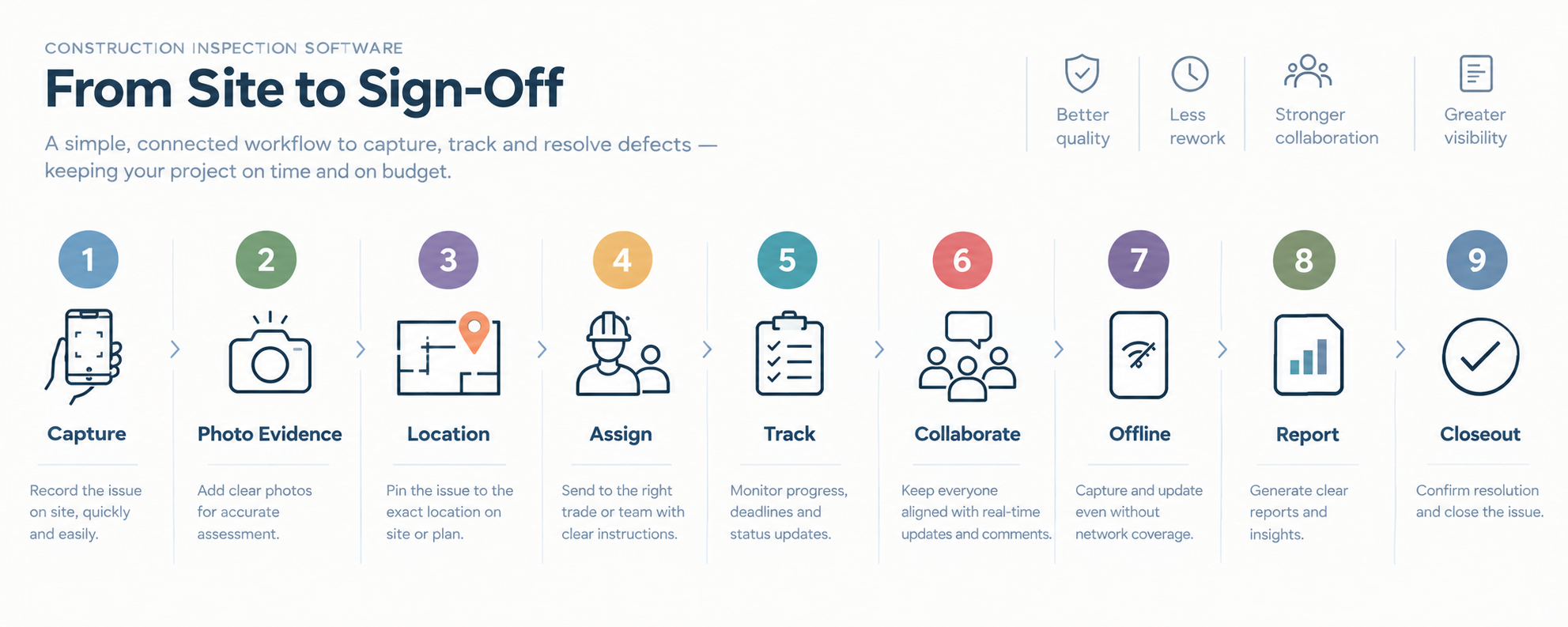
The best construction inspection app is one that fits the real workflow of capturing, assigning and verifying defects on site.
How Site Audit & Plan fits the construction inspection workflow
Site Audit & Plan is positioned as a simple, affordable inspection, snagging and defect management platform for professionals who inspect sites, buildings and properties on a regular basis.
Its workflow is designed around the practical sequence contractors need:
Inspect → Capture → Photograph → Locate → Assign → Resolve → Verify → Report
The platform includes Android and iOS mobile apps, a web app and offline functionality. Core capabilities include fast issue and defect capture, photo capture and markup, site-plan and location markup, location pins, assignment to users or team members, team collaboration, issue tracking through to completion, professional PDF reports and XLSX/Excel reports.
It can also be used across multiple projects and inspections.
A practical construction inspection app checklist
Capture
- Fast mobile issue capture
- Inspection checklists
- Digital inspection records
Evidence
- Photo evidence
- Photo markup or annotation
- Multiple photographs per issue
Location
- Location pins
- Site-plan markup
- Floor-plan or area references
Assignment
- Assign defects
- Assign issues to team members
- Clear responsibility
Tracking
- Outstanding defect tracking
- Status updates
- Follow-up inspections
- Resolution evidence
- Defect closeout
Collaboration
- Team collaboration
- Shared project records
- Multi-user workflows
Field use
- Offline inspection
- Mobile access
- Simple workflow for site teams
Reporting
- Professional PDF reports
- Excel/XLSX reporting
- Photo documentation
- Inspection records
Scale
- Multiple projects
- Multiple inspections
- Repeat inspection workflows
Frequently asked questions
What is a construction inspection app?
A construction inspection app is software used on a mobile device or web platform to record inspection findings, photographs, locations, actions and other site information digitally.
What is defect management software?
Defect management software helps construction teams record, assign, track, resolve and close defects or issues. It can connect defect records with evidence, responsibility, status and reporting.
What should I look for in a construction inspection app?
Look for fast issue capture, photo evidence, location tools, defect assignment, status tracking, collaboration, offline inspection, repeat inspections and professional reporting.
Can construction inspection apps work offline?
Some construction inspection apps support offline inspection, allowing users to continue recording findings where connectivity is unreliable. Check the software’s specific offline functionality before selecting it.
Can inspection software replace paper checklists?
Digital inspection software can replace many paper-based inspection workflows by allowing teams to capture findings, photographs, locations, assignments and reports in one system.
Why are location pins useful on construction sites?
Location pins give a visual reference for where an issue was found. They are especially useful on larger projects or where several similar areas contain defects.
Can construction inspection software track subcontractor defects?
Yes. A suitable workflow can assign defects or issues to responsible users or teams, making subcontractor defects easier to track through to resolution and closeout.
What reports should a construction inspection app produce?
Depending on contractor requirements, useful outputs can include PDF inspection reports, defect reports, issue logs, photos, locations and Excel or XLSX reports.
Final takeaway
The right construction inspection app is the one that fits the contractor’s real inspection and defect-management workflow.
The practical test is simple: can the site team capture an issue quickly, document it properly, locate it, assign it, track it, verify the correction and produce a useful record without recreating the information elsewhere?
That is where inspection and defect management software can add value. By connecting inspection, evidence, responsibility, tracking, resolution and reporting, contractors can create a more continuous workflow from the site walk through to defect closeout and construction handover.